The pace at which AI is rolling out is a real concern for many parents and caregivers. Chatbots in particular, I have noticed more questions in my sessions with parents and caregivers. ChatGPT, Gemini, Snapchat’s My AI – most of us have at least heard of those. But there’s a name that’s been popping up on children’s phones that many parents have never come across: Dola.
In just a few months, it has gone from virtually unknown to one of the most downloaded apps in the world. So in this blog, I am going to give you an overview of what it is, how young people are using it, what the concerns are, and – most importantly – how to talk to your child about it.
As always, the goal isn’t to panic. It’s to be informed and part of your young person’s digital world.
Dola is a free, all-in-one AI assistant app. Think of it as a rival of ChatGPT – you type or talk to it, and it answers questions, writes text and creates images. It’s available on Android, iPhone, Windows and Mac, and through a web browser.
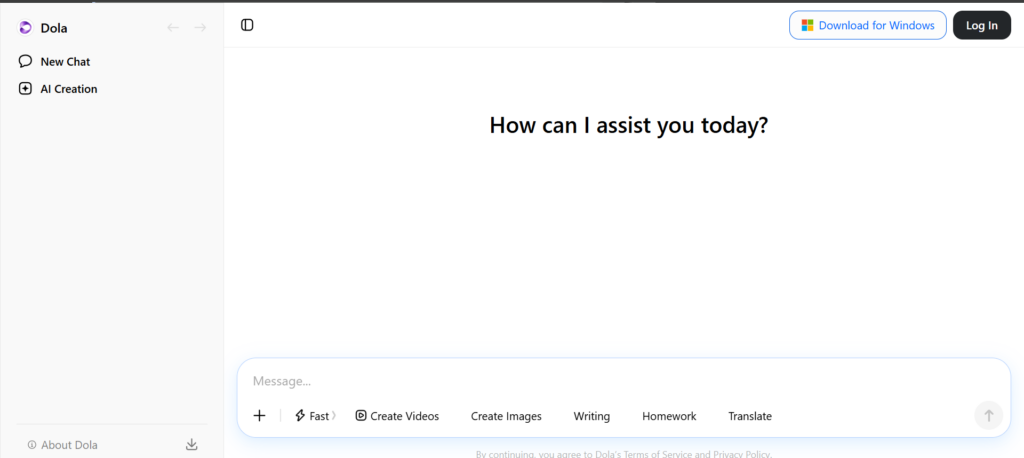
Dola was formerly called Cici and was renamed in late 2025. It’s run by a Singapore company, SPRING (SG) PTE. LTD., and is widely understood to be the international version of Doubao, the Chinese AI app made by ByteDance – the company that owns TikTok. It doesn’t carry ByteDance or TikTok branding branding, but sector reports now describe it openly as a ByteDance app.
Big. Dola surpassed 200 million downloads in early 2026 and overtook ChatGPT as the most-downloaded AI app in Southeast Asia. In Brazil, for example, it has been downloaded more than TikTok in May 2026. Most UK parents won’t have heard of it yet.
This is where it gets confusing. Dola’s own policy says the minimum age is 13. The App Store rates it 13+. But Vodafone’s Digital Parenting team found that UK users have to enter an 18+ date of birth to create an account, even on the website.
Quick note: if you search “Dola AI” you may find an older, unrelated WhatsApp calendar assistant with the same name. That’s a different product – this post is about the Dola app formerly called Cici.
Currently, there’s no published research that specifically looks at how UK children use Dola. What we do have is solid research from the UK and Ireland on how children use AI chatbots in general.
AI chatbots are already part of children’s everyday lives. AI chatbot use among 8-12-year-olds has risen from 5% in 2024 to 55% today, an elevenfold increase in just 2 years (CyberSafe Kids Report 2026). 12- 15-year-olds: 76% are using AI
When an app offers bots labelled for “dating advice” and “therapy”, it’s not hard to see how a vulnerable or struggling young person might turn to it.
It’s free, it’s simple, it shows you straight away what it can do, and the fun image and character features make it feel more like entertainment than a study tool. And as with any app, if their friends are using it, they’ll want to be too.
None of this means Dola is uniquely dangerous – many of these issues apply to AI chatbots generally. But there are some specific things about Dola that parents need to know.
There are none. Dola has built-in filters to block content like violence and adult themes, and users can report content via a form in settings. But there’s no way for a parent to see, limit or manage how their child uses it.
On the web app, for example, on first use it will prompt the user to enter a date of birth. Once the DOB has been entered, you can start using the service. Users can enter a fake DOB without any difficulty and use the service as an over-18
Bots built around anime characters, dating advice and “therapy” can feel personal and comforting. But they aren’t trained counsellors, and they aren’t friends. Experts quoted by Internet Matters warn that children may become reliant on chatbots and less likely to go to trusted adults for help.
This is the one I’d encourage every parent to be aware of. According to Dola’s own data protection policy:
You can find out more here Dola Privacy Statement
For context, ByteDance’s TikTok was fined £12.7 million by the UK’s Information Commissioner in 2023 for misusing children’s data. (Washington Times / AP) That doesn’t mean Dola is doing the same – but it’s reasonable for parents to want to know where their child’s photos and conversations end up.
The photo restyling features are fun, but every selfie uploaded is personal data. Children also need to understand that editing or restyling other people’s photos without permission – especially classmates – can quickly become hurtful or even harmful.
AI can and does get things wrong, and says them confidently. Internet Matters’ testing found chatbots giving inconsistent and sometimes dangerous answers. There can also be a real risk that leaning on AI for homework replaces learning rather than supporting it.
Dola doesn’t tell users which AI model is responding to them, and its terms state it isn’t responsible for third-party services built into the app. For a parent, that means less clarity about where answers come from.
Here is the thing: more and more AI features are built into the apps, search engines and phones children already use. What makes the real difference is you being part of the conversation.
The aim of the first chat is to find out. Try something like:
If they show you, sit with them and have a go yourself. You’ll learn far more side by side than across the kitchen table.
This is the conversation that matters most. Gently explore:
Make it clear that AI can be useful, but it isn’t a person, and it doesn’t really know them. Reassure them that they can always come to you – or another trusted adult – without getting into trouble.
Dola isn’t going away; like most technology, it can be useful: a quick explanation of a tricky maths problem, a bit of creative fun with friends. But with no parental controls, weak age checks and a lot of personal data changing hands, it’s not an app to leave children to figure out on their own.
You don’t need to be an AI expert to help your child use it safely. You just need to be curious, stay calm and keep talking. By reading this, you’re already doing that.
If you found this useful, please share it with another parent who needs to see it.
I offer one-to-one sessions for parents covering online safety, parental controls, and everything in between.
👉 Download the Parents App for clear step by step guides and practical guidance
👉 Book a one to one session with me to help with any questions or guidance you might need
Stay Safe Online
Wayne
Remember to share it with your family & friends.





Business, Career & Life Podcast